
Cursive Generator Online – Free Cursive Text Generator
Welcome to the easiest way to create beautiful cursive text — right from your browser, completely free.
How to Use the Cursive Text Generator
Getting cursive text is simple with our cursive generator. You’ll go from typing to copying in under a minute.
Enter Your Text
Type or paste the text you want to convert into beautiful cursive script.
Choose a Cursive Style
Browse through diverse styles and select your favorite cursive font variation.
Customize Cursive Text
Fine-tune the output, effects, and styling to match your exact aesthetic needs.
Cursive Copy & Paste
One-click copy your generated cursive text and use it anywhere across the web.
What Is Cursive Text?
Cursive is a style of writing where letters are connected in a flowing, joined manner. It’s designed to be written continuously; the pen rarely lifts off the page. Traditionally, cursive writing was taught in schools as the standard form of handwriting. Today, it’s used more for style than function, especially online.
What Does Cursive Text Look Like?
Cursive text has a flowing, slanted appearance. Letters connect smoothly to each other, creating a ribbon-like effect across the page.
Here’s a quick comparison:
The difference is immediately noticeable. Cursive feels warmer, more personal, and more creative than standard text.
How Cursive Text Works Online
Online cursive text uses Unicode — a global standard that assigns a unique code to every character in every language and symbol system.
Within Unicode, there are special mathematical and script characters that visually resemble cursive letters. When our generator converts your text, it swaps standard letters for these Unicode cursive equivalents.
The result is text that looks cursive on any device, any platform, any app — because the characters are cursive by nature, not by font.
What Is a Cursive Generator?
A cursive generator is a web tool that converts regular text into cursive-style characters using Unicode symbols. You type normal letters. The tool outputs their cursive Unicode versions. You copy and use them anywhere.
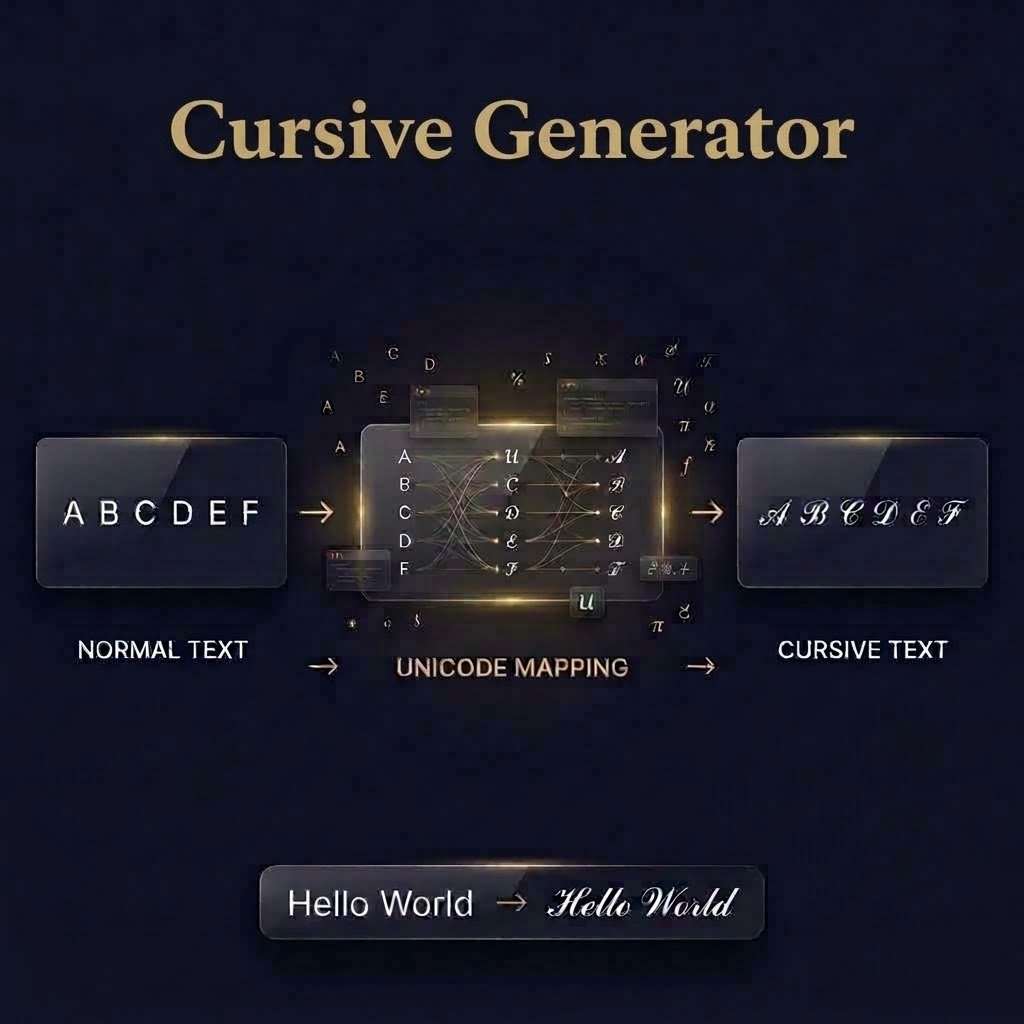
How a Cursive Generator Works?
Behind the scenes, the generator runs a simple mapping process. Every letter you type, A through Z, uppercase and lowercase, gets matched to its Unicode cursive equivalent.
Some styles use the Mathematical Script block (𝒶, 𝒷, 𝒸). Others pull from different Unicode ranges to create bolder or more decorative effects. The process is instant. There’s no server processing, no wait time, no complexity on your end.
Because the text created by cursive generator using Unicode characters, you can easily copy and paste your cursive results into social media posts, messages, profiles, captions, bios, and other platforms. The generated text does not require a special font file or application to be installed
Why Use a Cursive Generator?
The main reason is portability. You get cursive-looking text that works anywhere without needing to install anything. It’s also fast. You can generate, preview, and copy in under ten seconds. For social media users and content creators, that kind of speed matters.
Popular Uses for Cursive Text
Cursive text created by a cursive generator tool shows up everywhere once you start looking for it. Here are the most common ways people use it.
Social Media Bios
Stand out on Instagram, TikTok, and Twitter with an elegant profile bio.
Names and Usernames
Make your handle look intentional and memorable across platforms.
Cursive Signature
A typed signature that feels handwritten; great for emails & PDFs.
Event Invitations
Elegant for announcements, RSVPs & digital event invites.
Gaming & Discord
Unique usernames and server bios that stand out in a crowd.
Tattoos & Designs
Preview how words look in script before your appointment.
Branding & Creative
Elevate Canva templates, mood boards, and social posts.
Many more…
Captions, poetry, menus, certificates, announcements, and invitations.
Difference between Cursive Text Generator and Cursive Font Generator
Cursive generators serve different purposes depending on your needs. A cursive text generator is ideal when you want ready-to-use cursive text that you can quickly copy and paste online, while a cursive font generator is better when you need fonts for documents, designs, or print projects. The table below highlights the key differences to help you choose the right option.
Cursive Text Generator
- Creates cursive text using Unicode characters that look like cursive lettering.
- Your text is ready to copy and paste wherever Unicode is supported.
- Perfect for social media, usernames, Instagram bios, captions, and quick online use.
- No downloads, font installation, or design software needed. Just type, copy, and paste.
- Choose a cursive text generator when you want stylish text quickly and easily.
Cursive Font Generator
- Creates cursive font styles that look like elegant, handwritten lettering.
- Lets you choose from different cursive font styles for your text.
- Perfect for logos, invitations, designs, social media, and creative projects.
- Gives you more visual control over the look and style of your text.
- Choose a cursive font generator when you want stylish text with a specific font look.
Cursive Letters A to Z
Learning cursive or teaching it? See how each letter looks in script form.

Consistent Slant
Maintain a uniform forward angle (approx. 45°–55°) across every letter so your script looks seamless and natural.
Continuous Flow
Connect letters with smooth, fluid strokes rather than lifting your pen off the page repeatedly while writing.
Even Proportions
Keep the heights of ascenders (l, b, h) and descenders (g, y, p) evenly balanced according to your guidelines.
Why Use Our Cursive Generator?
There are a lot of cursive generator tools online. Here’s what makes this one different.
Live Preview
See your cursive text update as you type. No submit button, no waiting. What you see is exactly what you’ll copy.
Multiple Cursive Styles
Explore different cursive styles with one click, each offering a unique look to match your personal preference.
One-Click Copy & Paste
When you’re ready, copy your text instantly. One button, zero friction. Paste it anywhere in seconds.
Free & Easy to Use
There’s no paywall, no premium tier for extra styles, and no subscription required. Everything is free.
Mobile-Friendly
The generator works just as well on a phone as on a desktop. The layout adjusts automatically, so you can generate and copy from anywhere.
No Signup Required
You don’t need an account, an email address, or any personal information while using our cursive generator tool. Open the page and start typing.
No Download Required
Everything runs directly in your browser. No apps, no extensions, no software installations of any kind.
Export Options [PNG / SVG / PDF]
Want to use your cursive text in a design? Export it as a PNG image, an SVG file for scalable graphics, or a PDF for print-ready use.